Dust can quietly reduce the performance of heavy-duty industrial lights. It settles on lenses, cooling fins, seals, and mounting brackets. In busy workshops, a thin gray layer may become oily and stubborn within days. Cleaning is not only about appearance. It can improve light output, reduce heat buildup, and help reveal early damage.
This guide explains how to clean dust off heavy duty industrial light fittings safely and effectively. It focuses on practical methods for warehouses, factories, garages, and outdoor work areas. Before touching any fitting, switch off the power and follow the manufacturer’s instructions. Allow hot lamps or LED housings to cool completely. Use suitable gloves, eye protection, and a stable access platform when needed.
A soft, dry microfiber cloth is often the safest starting point. It can remove loose dust without scratching a lens. A vacuum with a soft brush attachment may help around vents and edges. Avoid forcing dust into seals, connectors, or cooling channels. For greasy marks, use a lightly damp cloth with a mild, approved cleaner. Never spray liquid directly onto the fitting.
Small details matter.
Check cracked lenses, loose screws, darkened areas, and damaged cables during cleaning. These signs may need attention from a qualified professional. I have found that rushed cleaning often misses the rear housing, where dust collects heavily. That weakness deserves attention. Cleaning schedules should reflect the environment, not guesswork. Record the date, condition, and method used. This creates a more reliable maintenance history and supports safer decisions later.
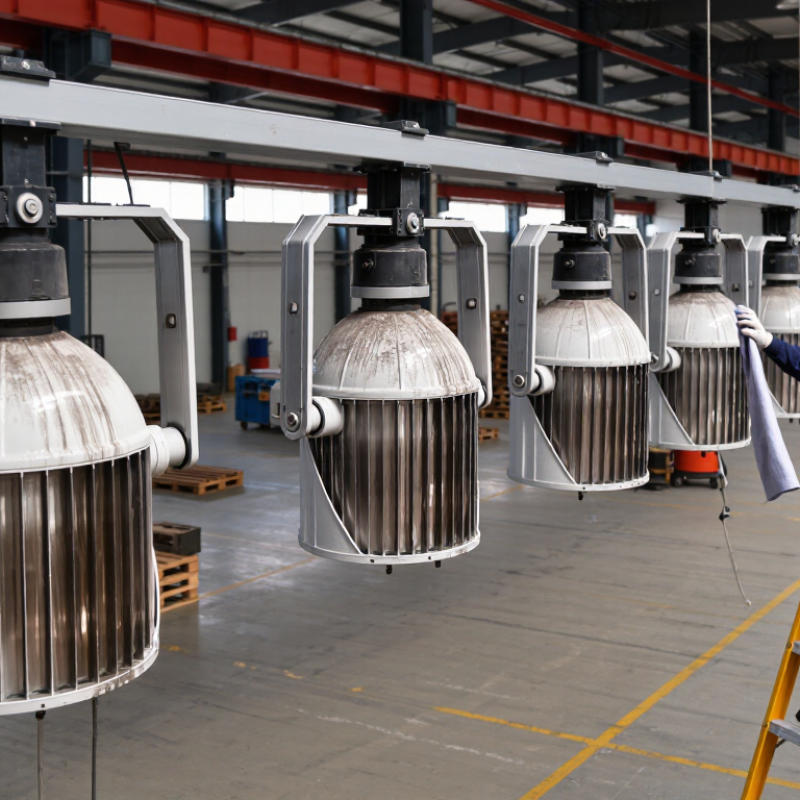
How to Clean Dust Off China Best Heavy Duty Lights?
Before cleaning a heavy duty light, identify its materials, power source, and dust level. Aluminum housings usually tolerate a dry microfiber cloth. Painted steel needs gentler pressure because scratches can expose the surface. Glass lenses can handle careful wiping, while polycarbonate lenses may cloud when exposed to harsh solvents. Check the manual if the material is uncertain.
Disconnect mains-powered lights at the breaker. Remove batteries from portable units. Never spray water directly onto the fixture, even when it appears sealed. Inspect vents, cooling fins, cable glands, and lens edges for dust buildup. A thin surface layer needs brushing and wiping. Thick, greasy dust may require a slightly damp cloth with mild detergent. Keep moisture away from switches and connectors.
Start with a soft brush.
Use low-pressure air for recessed dust, but avoid forcing particles into the housing. Wipe in one direction, then inspect the lens under a bright lamp. I once cleaned a dusty reflector too aggressively and left fine marks that reduced its appearance. That mistake changed my method: test a hidden area first. For lights installed overhead, stabilize the ladder and let a qualified person isolate fixed wiring. If dust returns quickly, check nearby machinery, airflow, and failed seals instead of cleaning repeatedly.
| Light Component or Type | Common Material | Power Source | Typical Dust Level | Recommended Cleaning Method | Cleaning Frequency | Important Safety Check |
|---|---|---|---|---|---|---|
| Powder-coated steel housing | Painted or powder-coated steel | Mains electricity | Moderate | Switch off power, let the fixture cool, then wipe with a dry microfiber cloth. Use a slightly damp cloth for firmly attached dust and dry the surface afterward. | Every 1–3 months | Check for chipped coating, corrosion, loose screws, and exposed wiring. |
| Aluminum heat sink or body | Anodized or bare aluminum | Mains electricity or low-voltage driver | High | Remove loose dust with a soft brush or low-pressure vacuum. Clean between fins without bending them or forcing dust into the driver. | Monthly in dusty areas | Confirm that cooling fins and ventilation openings are not blocked. |
| Glass lens or cover | Tempered or borosilicate glass | Mains electricity | Low to Moderate | Use a clean microfiber cloth. If needed, apply a small amount of diluted mild detergent to the cloth, never directly onto the fixture. | Every 1–3 months | Do not clean hot glass with cold liquid; inspect for cracks before re-energizing. |
| Polycarbonate lens or diffuser | UV-stabilized polycarbonate | LED driver powered by mains electricity | Moderate | Wipe gently with a soft, non-abrasive cloth and mild soapy water. Avoid solvents, scouring pads, and ammonia-based cleaners. | Every 1–2 months | Check for yellowing, crazing, scratches, or loss of light transmission. |
| LED board and internal driver | Electronic components, circuit board, and metal heat sink | AC mains converted to regulated DC | High | Do not spray liquid inside. Clean only accessible surfaces with a dry anti-static brush or low-pressure vacuum. | Every 3–6 months | Isolate the electrical supply and allow stored energy to discharge before opening any enclosure. |
| Outdoor sealed fixture | Aluminum or steel body with glass or polycarbonate cover | Mains electricity or solar-charged battery | Very High | Remove surface dust with a soft brush, then wipe exterior surfaces with a damp microfiber cloth. Keep water away from cable glands and connectors. | Monthly or after heavy dust events | Inspect seals, gaskets, cable entries, and drain paths before returning the light to service. |
| Battery-powered work light | Plastic housing, aluminum reflector, and rubber seals | Rechargeable lithium-ion or sealed battery pack | Moderate to High | Turn off the light and remove the battery if practical. Brush away dry dust and wipe the housing with a barely damp cloth. | Weekly to monthly, depending on use | Do not clean or charge a damaged, swollen, wet, or overheated battery. |
Identify the housing, lens material, power source, and dust level. Aluminum tolerates gentle dry wiping. Painted steel needs lighter pressure.
Switch off the circuit breaker for fixed lights. Remove batteries from portable units. Let hot parts cool completely before cleaning.
No. Keep liquid away from switches, connectors, cable entries, and ventilation openings. Even sealed-looking fixtures can admit moisture.
Start with a soft brush or dry microfiber cloth. Clean from top to bottom. Use low-pressure air for recessed dust.
Use a slightly damp cloth with mild soap solution. Avoid rough pads and strong solvents. Polycarbonate surfaces may become cloudy.
Loosen packed dust with a small clean brush. A low-suction vacuum can collect debris. Do not push dust deeper inside.
Yes. Test a hidden area before wiping the visible surface. I once cleaned too aggressively and left fine marks.
Stop for cracked lenses, loose housings, brittle seals, or exposed wiring. Cleaning cannot repair structural damage. That is easy to overlook.
Replace covers, seals, reflectors, and screws correctly. Check that wires are not pinched. Restore power in a clear, dry area.
Watch for flickering, unusual heat, odor, noise, or delayed startup. Stop immediately if anything seems abnormal. Record the cleaning date.
Cleaning heavy-duty lights safely starts with identifying the fixture’s materials, power source, construction, and level of dust buildup. Prepare a clean, well-ventilated work area and gather suitable tools such as a soft brush, lint-free cloth, vacuum with a gentle attachment, and approved mild cleaner if needed. Before beginning, switch off the light, disconnect it from the power supply, and allow hot components to cool completely.
To understand how to clean dust off heavy duty industrial light fittings, remove loose dust from the housing, lens, vents, and surrounding parts without scratching surfaces or forcing debris inside the fixture. Avoid excessive moisture near electrical components, and never operate the light while it is open or damp. After cleaning, inspect the lens, seals, wiring, fasteners, and ventilation openings for damage or blockage. Reassemble all parts securely, restore power only when the fixture is dry and properly closed, and test its operation from a safe position.

 Merak Lighting